2022 Toyota Sienna Owner’s Manual — Using the driving support systems
Driving
Cruise control
Summary of functions
Use cruise control to maintain a set speed without depressing the accelerator pedal.
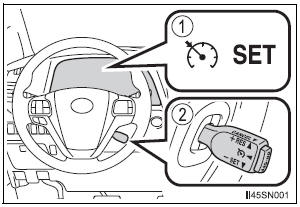
- Indicators
- Cruise control switch
Setting the vehicle speed
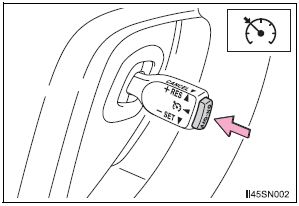
- Press the “ON-OFF” button to activate the cruise control.
Cruise control indicator will come on*1 or will be displayed on the multi-information display*2.
Press the button again to deactivate the cruise control.
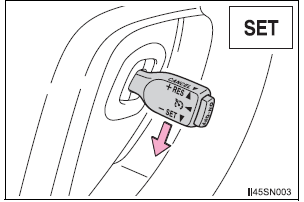
- Accelerate or decelerate the vehicle to the desired speed, and push the lever down to set the speed.
“SET” indicator will come on*1 or will be displayed on the multi-information display*2.
The vehicle speed at the moment the lever is released becomes the set speed.
*1: Vehicles with monochrome display *2: Vehicles with color display.
Adjusting the set speed
To change the set speed, operate the lever until the desired set speed is obtained.
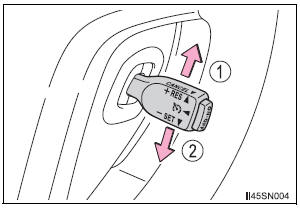
- Increases the speed
- Decreases the speed
Fine adjustment: Momentarily move the lever in the desired direction.
Large adjustment: Hold the lever in the desired direction.
The set speed will be increased or decreased as follows: Fine adjustment: By approximately 1 mph (1.6 km/h) each time the lever is operated.
Large adjustment: The set speed can be increased or decreased continually until the lever is released.
Canceling and resuming the constant speed control
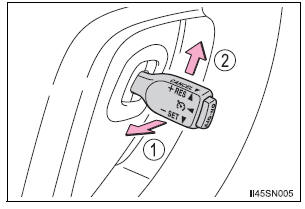
- Pulling the lever toward you cancels the constant speed control.
The speed setting is also canceled when the brakes are applied.
- Pushing the lever up resumes the constant speed control.
Resuming is available when the vehicle speed is more than approximately 25 mph (40 km/h).
Cruise control can be set when
- The shift lever is in D or the range 4, 5 or 6 of S has been selected.
- Vehicle speed is above approximately 25 mph (40 km/h).
Accelerating after setting the vehicle speed
- The vehicle can be accelerated normally. After acceleration, the set speed resumes.
- Even without canceling the cruise control, the set speed can be increased by first accelerating the vehicle to the desired speed and then pushing the lever down to set the new speed.
Automatic cruise control cancelation
Cruise control will stop maintaining the vehicle speed in any of the following situations.
- Actual vehicle speed falls more than approximately 10 mph (16 km/h) below the preset vehicle speed.
At this time, the memorized set speed is not retained.
- Actual vehicle speed is below approximately 25 mph (40 km/h).
- VSC is activated.
Operation guide display (vehicles with a multi-information display [with color display])
- When the cruise control switch is operated, a guidance display is shown on the multi-information display for a few seconds as to how to operate the cruise control switch.
- When selecting
 tab on the
multi-information display:
If the warning message for the cruise control is shown on the multiinformation display
Press the “ON-OFF” button once to deactivate the system, and then press the button again to reactivate the system.
If the cruise control speed cannot be set or if the cruise control cancels immediately after being activated, there may be a malfunction in the cruise control system. Have the vehicle inspected by your Toyota dealer.
| WARNING
To avoid operating the cruise control by mistake Switch the cruise control off using the “ON-OFF” button when not in use. Situations unsuitable for cruise control Do not use cruise control in any of the following situations. Doing so may result in loss of control and could cause an accident resulting in death or serious injury.
|
Dynamic radar cruise control
Summary of functions
Dynamic radar cruise control supplements conventional cruise control with a vehicle-to-vehicle distance control. In vehicle-to-vehicle distance control mode, the vehicle automatically accelerates or decelerates in order to maintain a set following distance from vehicles ahead.

- Multi-information display
- Indicators The indicators are intended as an example.
- Vehicle-to-vehicle distance display
- Set speed
- Vehicle-to-vehicle distance button
- Cruise control switch
Setting the vehicle speed (vehicle-to-vehicle distance control mode)

- Press the “ON-OFF” button to activate the cruise control.
Dynamic radar cruise control indicator will be displayed.
Press the button again to deactivate the cruise control.

- Accelerate or decelerate the vehicle to the desired speed, and push the lever down to set the speed.
“SET” indicator will be displayed.
The vehicle speed at the moment the lever is released becomes the set speed.
Adjusting the set speed
To change the set speed, operate the lever until the desired set speed is displayed.
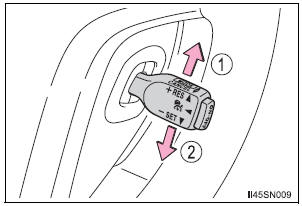
- Increases the speed
- Decreases the speed Fine adjustment: Momentarily move the lever in the desired direction.
Large adjustment: Hold the lever in the desired direction.
In the vehicle-to-vehicle distance control mode, the set speed will be increased or decreased as follows:
- • When the set speed is shown in “MPH” Fine adjustment: By approximately 1 mph (1.6 km/h) each time the lever is operated
Large adjustment: By approximately 5 mph (8 km/h) for each 0.75 seconds the lever is held - When the set speed is shown in “km/h” Fine adjustment: By approximately 0.6 mph (1 km/h) each time the lever is operated
Large adjustment: By approximately 3.1 mph (5 km/h) for each 0.75 seconds the lever is held
In the constant speed control mode , the set speed will be increased or decreased as follows: Fine adjustment: By approximately 1 mph (1.6 km/h) each time the lever is operated Large adjustment: The set speed can be increased or decreased continually until the lever is released.
Changing the vehicle-to-vehicle distance
Pressing the button changes the vehicle-to-vehicle distance as follows:
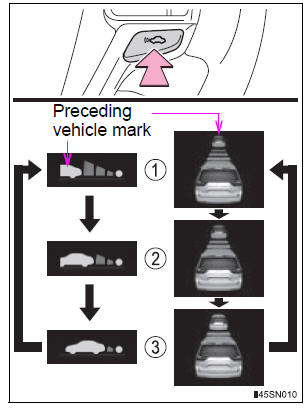
- Long
- Medium
- Short
The vehicle-to-vehicle distance is set automatically to long mode when the engine switch is turned to IGNITION ON mode.
If a vehicle is running ahead of you, the preceding vehicle mark will be also displayed.
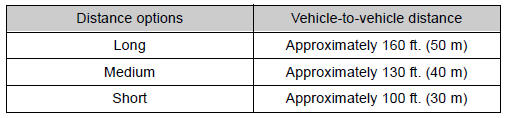
Vehicle-to-vehicle distance settings
Select a distance from the table below. Note that the distances shown correspond to a vehicle speed of 50 mph (80 km/h). Vehicle-to-vehicle distance increases/decreases in accordance with vehicle speed.
Canceling and resuming the speed control
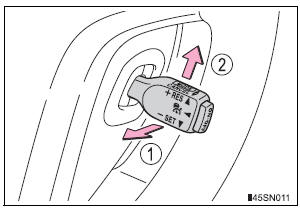
- Pulling the lever toward you cancels the cruise control.
The speed setting is also canceled when the brakes are applied.
- Pushing the lever up resumes the cruise control and returns vehicle speed to the set speed.
Resuming is available when the vehicle speed is more than approximately 25 mph (40 km/h).
Driving in vehicle-to-vehicle distance control mode
This mode employs a radar sensor to detect the presence of vehicles up to approximately 400 ft. (120 m) ahead, determines the current vehicle-to-vehicle following distance, and operates to maintain a suitable following distance from the vehicle ahead.
Note that vehicle-to-vehicle distance will close in when traveling on long downhill slopes.
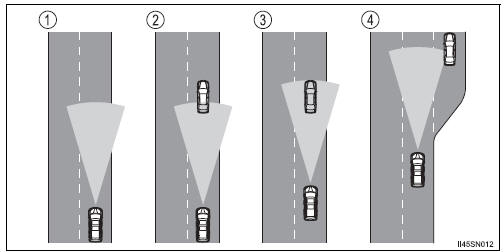
- Example of constant speed cruising When there are no vehicles ahead
The vehicle travels at the speed set by the driver. The desired vehicle-tovehicle distance can also be set by operating the vehicle-to-vehicle distance control.
- Example of deceleration cruising When the vehicle ahead is driving slower than the set speed
When a vehicle is detected running ahead of you, the system automatically decelerates your vehicle. When a greater reduction in vehicle speed is necessary, the system applies the brakes. A warning tone warns you when the system cannot decelerate sufficiently to prevent your vehicle from closing in on the vehicle ahead.
- Example of follow-up cruising When following a vehicle driving slower than the set speed
The system continues follow-up cruising while adjusting for changes in the speed of the vehicle ahead in order to maintain the vehicle-to-vehicle distance set by the driver.
- Example of acceleration When there are no longer any vehicles ahead driving slower than the set speed
The system accelerates until the set speed is reached. The system then returns to constant speed cruising.
Approach warning
When your vehicle is too close to a vehicle ahead, and sufficient automatic deceleration via the cruise control is not possible, the display will flash and the buzzer will sound to alert the driver. An example of this would be if another driver cuts in front of you while you are following a vehicle. Apply the brakes to ensure an appropriate vehicle-tovehicle distance.
Warnings may not occur when
In the following instances, there is a possibility that the warnings will not occur:
- When the speed of the vehicle ahead matches or exceeds your vehicle speed
- When the vehicle ahead is traveling at an extremely slow speed
- Immediately after the cruise control speed was set
- At the instant the accelerator is applied
Selecting conventional constant speed control mode
Constant speed control mode differs from vehicle-to-vehicle distance control mode. When constant speed control mode is selected, your vehicle will maintain a set speed regardless of whether or not there are other vehicles in the lane ahead.
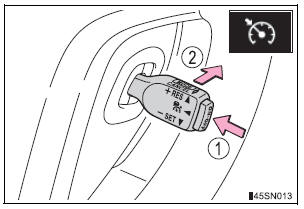
- Press the “ON-OFF” button to activate the cruise control.
Press the button again to deactivate the cruise control.
- Switch to constant speed control mode.
(Push the lever forward and hold for approximately one second)
Constant speed control mode indicator will be displayed.
When in constant speed control mode, to return to vehicle-to-vehicle distance control mode, push the lever forward again and hold for approximately 1 second.
After the desired speed has been set, it is not possible to return to vehicleto- vehicle distance control mode.
If the engine switch is turned off and then turned to IGNITION ON mode again, the vehicle will automatically return to vehicle-to-vehicle distance control mode.
Adjusting the speed setting: Canceling and resuming the speed setting:
Dynamic radar cruise control can be set when
- The shift lever is in the D or the range 4, 5 or 6 of S has been selected.
- Vehicle speed is above approximately 30 mph (50 km/h).
Accelerating after setting the vehicle speed
The vehicle can accelerate normally. After acceleration, the set speed resumes. However, during vehicle-to-vehicle distance control mode, the vehicle speed may decrease below the set speed in order to maintain the distance to the vehicle ahead.
Automatic cancelation of vehicle-to-vehicle distance control
Vehicle-to-vehicle distance control driving is automatically canceled in the following situations:
- Actual vehicle speed falls below approximately 25 mph (40 km/h).
- VSC is activated.
- The sensor cannot operate correctly because it is covered in some way.
- The windshield wipers are operating at high speed (when the wiper switch is set to the “AUTO” mode or the high speed wiper operation position).
If vehicle-to-vehicle distance control driving is automatically canceled for any other reason, there may be a malfunction in the system. Contact your Toyota dealer.
Automatic cancelation of constant speed control
The cruise control will stop maintaining the vehicle speed in the following situations.
- Actual vehicle speed is more than approximately 10 mph (16 km/h) below the set vehicle speed.
At this time, the memorized set speed is not retained.
- Vehicle speed falls below approximately 25 mph (40 km/h).
- VSC is activated.
Radar sensor and grille cover
Always keep the sensor and grille cover clean to ensure that the vehicle-tovehicle distance control operates properly. (Some obstructions, such as snow, ice and plastic objects, cannot be detected by the obstruction sensor.) Dynamic radar cruise control is canceled if an obstruction is detected.
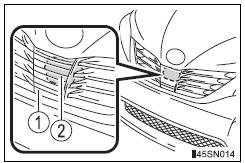
- Grille cover
- Radar sensor
Operation guide display
- When the dynamic radar cruise control switch is operated, a guidance display is shown on the multi-information display for a few seconds as to how to operate the dynamic radar cruise control switch or distance switch.
- When selecting
 or
or
 tab on the multi-information
display:
Warning messages and buzzers for dynamic radar cruise control
Warning messages and buzzers are used to indicate a system malfunction or to inform the driver of the need for caution while driving. (, 556)
Certification
- For vehicles sold in the U.S.A.
FCC ID: HYQDNMWR004
This device complies with part 15 of the FCC Rules. Operation is subject to the following two conditions: (1) This device may not cause harmful interference, and (2) this device must accept any interference received, including interference that may cause undesired operation.
FCC WARNING Changes or modifications not expressly approved by the party responsible for compliance could void the user’s authority to operate the equipment.
Radiofrequency radiation exposure Information: This equipment complies with FCC radiation exposure limits set forth for an uncontrolled environment.
This equipment should be installed and operated with minimum distance of 20 cm between the radiator (antenna) and your body.
This transmitter must not be co-located or operating in conjunction with any other antenna or transmitter.
- For vehicles sold in Canada
This device complies with Industry Canada licence-exempt RSS standards.
Operation is subject to the following two conditions: (1) this device may not cause interference, and (2) this device must accept any interference, including interference that may cause undesired operation of the device.
| WARNING
Before using dynamic radar cruise control Do not overly rely on vehicle-to-vehicle distance control. Be aware of the set speed. If automatic deceleration/acceleration is not appropriate, adjust the vehicle speed, as well as the distance between your vehicle and vehicles ahead by applying the brakes, etc. Cautions regarding the driving assist systems Observe the following precautions. Failure to do so may cause an accident resulting in death or serious injury.
To avoid inadvertent cruise control activation Switch the cruise control off using the “ON-OFF” button when not in use. Situations unsuitable for dynamic radar cruise control Do not use dynamic radar cruise control in any of the following situations. Doing so may result in inappropriate speed control and could cause an accident resulting in death or serious injury.
When the sensor may not be correctly detecting the vehicle ahead Apply the brakes as necessary when any of the following types of vehicles are in front of you. As the sensor may not be able to correctly detect these types of vehicles, the approach warning will not be activated, and a fatal or serious accident may result.
Conditions under which the vehicle-to-vehicle distance control may not function correctly Apply the brakes as necessary in the following conditions as the radar sensor may not be able to correctly detect vehicles ahead, and a fatal or serious accident may result:
Handling the radar sensor Observe the following to ensure the cruise control system can function effectively: Otherwise, the system may not function correctly and could result in an accident.
|
Intuitive parking assist
The distance from your vehicle to nearby obstacles when parallel parking or maneuvering into a garage is measured by the sensors and communicated via the multi-information display, the audio system screen and a buzzer. Always check the surrounding area when using this system.
Types of sensors
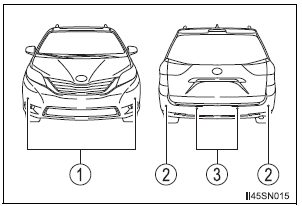
- Front corner sensors (if equipped)
- Rear corner sensors
- Rear center sensors
Intuitive parking assist switch
Turns the intuitive parking assist on/off
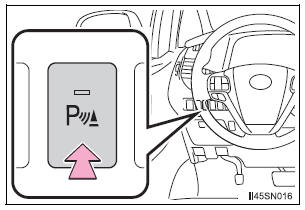
When on, the indicator light comes on and the buzzer sounds to inform the driver that the system is operational.
Display
When the sensors detect an obstacle, the following displays inform the driver of the position and distance to the obstacle.
Multi-information display
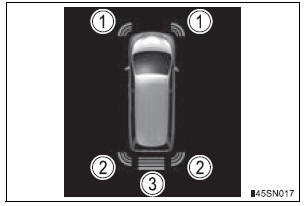
- Front corner sensor operation
- Rear corner sensor operation
- Rear center sensor operation
Audio system screen
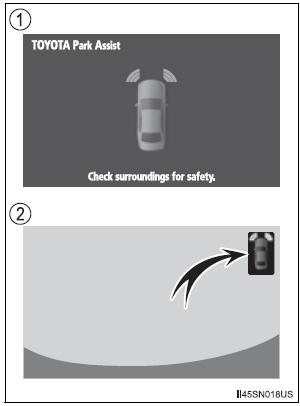
- Intuitive parking assist display When the rear view monitor system is not displayed.
A graphic is automatically displayed when an obstacle is detected. The screen can be set so that the graphic is not displayed.
- Insert display
When the rear view monitor system is displayed.A simplified image is displayed on the right upper corner of the audio system screen when an obstacle is detected.
Sensor detection display, obstacle distance
Distance display
Sensors that detect an obstacle will illuminate continuously or blink.
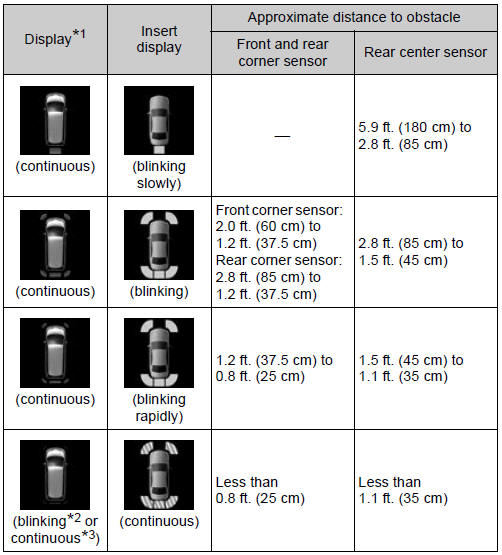
*1: The images may differ from that shown in the illustrations. *2: Multi-information display *3: Audio system screen
Buzzer operation and distance to an obstacle
A buzzer sounds when the sensors are operating.
- The buzzer sounds faster as the vehicle approaches an obstacle.
When the vehicle comes within the following distance of the obstacle, the buzzer sounds continuously.
- Front and rear corner sensors: Approximately 0.8 ft. (25 cm)
- Rear center sensors: Approximately 1.1 ft. (35 cm)
- When 2 or more obstacles are detected simultaneously, the buzzer system responds to the nearest obstacle. If one or both come within the above distances, the beep will repeat a long tone, followed by fast beeps.
Detection range of the sensors
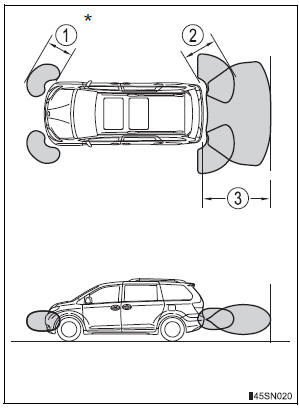
- Approximately 2.0 ft. (60 cm)
- Approximately 2.8 ft. (85 cm)
- Approximately 5.9 ft. (180 cm)
The diagram shows the detection range of the sensors. Note that the sensors cannot detect obstacles that are extremely close to the vehicle.
The range of the sensors may change depending on the shape of the object etc.
*: if equipped
Setting up intuitive parking assist
You can change the buzzer sound volume and the screen operating conditions.
- Press the “APPS” button.
- Select “Setup” on the screen.
- Select “Vehicle” on the screen.
- Select “TOYOTA Park Assist Settings” on the screen.
- Select the desired item.
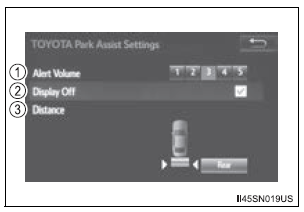
- The buzzer sound volume can be adjusted.
- On or off can be selected for intuitive parking assist display.
- Rear center sensor display and tone indication can be set.
The intuitive parking assist can be operated when
- The engine switch is in the “ON” position (vehicles without a smart key system) or IGNITION ON mode (vehicles with a smart key system).
- Front corner sensors:
- The shift lever is not in P.
- The vehicle speed is approximately 6 mph (10 km/h) or less.
- Rear corner and rear center sensors: The shift lever is in R.
Intuitive parking assist display
When an obstacle is detected while the rear view monitor system is in use, the warning indicator will appear in the upper corner of the screen even if the display setting has been set to off.
Sensor detection information
- The sensor’s detection areas are limited to the areas around the vehicle’s bumper.
- Certain vehicle conditions and the surrounding environment may affect the ability of the sensor to correctly detect obstacles. Particular instances where this may occur are listed below.
- There is dirt, snow or ice on the sensor. (Wiping the sensors will resolve this problem.)
- The sensor is frozen. (Thawing the area will resolve this problem.) In especially cold weather, if a sensor is frozen the screen may show an abnormal display, or obstacles may not be detected.
- The sensor is covered in any way.
- The vehicle is leaning considerably to one side.
- On an extremely bumpy road, on an incline, on gravel, or on grass
- The vicinity of the vehicle is noisy due to vehicle horns, motorcycle engines, air brakes of large vehicles, or other loud noises producing ultrasonic waves.
- There is another vehicle equipped with parking assist sensors in the vicinity.
- The sensor is coated with a sheet of spray or heavy rain.
- The vehicle is equipped with a fender pole or wireless antenna.
- The bumper or sensor receives a strong impact.
- The vehicle is approaching a tall or curved curb.
- In harsh sunlight or intense cold weather
- The area directly under the bumpers is not detected.
- If obstacles draw too close to the sensor.
- A non-genuine Toyota suspension (lowered suspension etc.) is installed.
- People may not be detected if they are wearing certain types of clothing.
In addition to the examples above, there are instances in which, because of their shapes, signs and other objects may be judged by the sensor to be closer than they are.
- The shape of the obstacle may prevent the sensor from detecting it. Pay particular attention to the following obstacles:
- Wires, fences, ropes, etc.
- Cotton, snow and other materials that absorb sound waves
- Sharply-angled objects
- Low obstacles
- Tall obstacles with upper sections projecting outwards in the direction of your vehicle
- The following situations may occur during use.
- Depending on the shape of the obstacle and other factors, the detection distance may shorten, or detection may be impossible.
- Obstacles may not be detected if they are too close to the sensor.
- There will be a short delay between obstacle detection and display. Even at slow speeds, there is a possibility that the obstacle will come within the sensor’s detection areas before the display is shown and the beep sounds.
- Thin posts or objects lower than the sensor may not be detected when approached, even if they have been detected once.
- It might be difficult to hear beeps due to the volume of audio system or air flow noise of the air conditioning system.
If the display flashes and a message is displayed
Certification (Canada only)
This ISM device complies with Canadian ICES-001.
| WARNING
When using the Intuitive parking assist-sensor Observe the following precautions. Failure to do so may result in the vehicle being unable to be driven safely and possibly cause an accident.
|
| NOTICE
When using intuitive parking assist In the following situations, the system may not function correctly due to a sensor malfunction etc. Have the vehicle checked by your Toyota dealer.
Notes when washing the vehicle Do not apply intensive bursts of water or steam to the sensor area. Doing so may result in the sensor malfunctioning. |
Rear view monitor system
The rear view monitor system assists the driver by displaying an image of the view behind the vehicle and guide lines while backing up, for example while parking. The screen illustrations used in this text are intended as examples, and may differ from the image that is actually displayed on the screen.
- With guide function
Refer to the “NAVIGATION AND MULTIMEDIA SYSTEM OWNER’S MANUAL”.
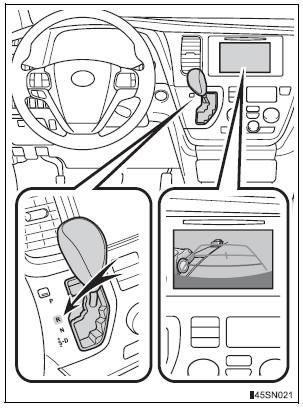
- Without guide function
The rear view monitor system will activate when the shift lever is in R.
If you move the lever out of R, the rear view monitor system will be deactivated.
When the shift lever is shifted to R and any mode button (such as “APPS”/“SETUP”) is pressed, the rear view monitor system is canceled, and the screen is switched to the mode of the button that was pressed.
Using the rear view monitor system
Screen description
The rear view monitor system screen will be displayed if the shift lever is shifted to R while the engine switch is in the “ON” position (vehicles without a smart key system) or IGNITION ON mode (vehicles with a smart key system).
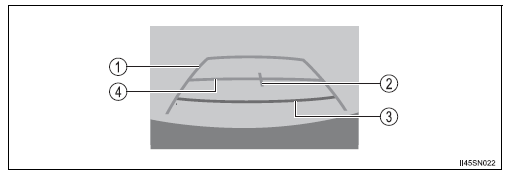
- Vehicle width guide line The line indicates a guide path when the vehicle is being backed straight up.
The displayed width is wider than the actual vehicle width.
- Vehicle center guide line These lines indicate the estimated vehicle center on the ground.
- Distance guide line The line shows distance behind the vehicle, a point approximately 1.5 ft.
(0.5 m) (red) from the edge of the bumper.
- Distance guide line The line shows distance behind the vehicle, a point approximately 3 ft.
(1 m) (blue) from the edge of the bumper.
Rear view monitor system precautions
Area displayed on screen
The rear view monitor system displays an image of the view from the bumper of the rear area of the vehicle.
The image on the rear view monitor system can be adjusted.
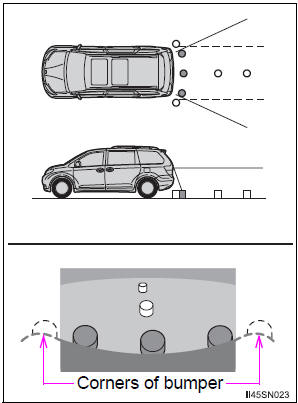
- The area displayed on the screen may vary according to vehicle orientation conditions.
- Objects which are close to either corner of the bumper or under the bumper cannot be displayed.
- The camera uses a special lens.
The distance of the image that appears on the screen differs from the actual distance.
- Items which are located higher than the camera may not be displayed on the monitor.
- If your vehicle is equipped with a backlit license plate, it may interfere with the display.
Rear view monitor system camera
The camera for the rear view monitor system is located above the license plate.
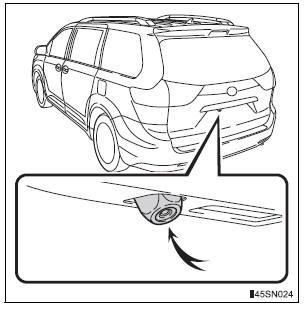
- Using the camera
If dirt or foreign matter (such as water droplets, snow, mud etc.) is adhering to the camera, it cannot transmit a clear image. In this case, flush it with a large quantity of water and wipe the camera lens clean with a soft and wet cloth.
Differences between the screen and the actual road
The distance guide lines and the vehicle width guide lines may not actually be parallel with the dividing lines of the parking space, even when they appear to be so. Be sure to check visually.
The distances between the vehicle width guide lines and the left and right dividing lines of the parking space may not be equal, even when they appear to be so. Be sure to check visually.
The distance guide lines give a distance guide for flat road surfaces.
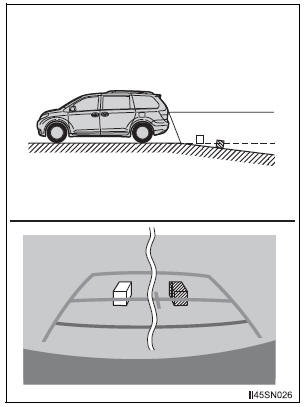
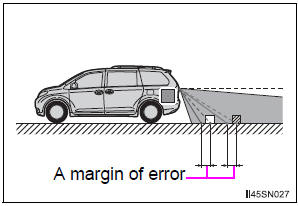
In any of the following situations, there is a margin of error between the fixation guide lines on the screen and the actual distance/ course on the road.
- When the ground behind the vehicle slopes up sharply The distance guide lines will appear to be closer to the vehicle than the actual distance.
Because of this, objects will appear to be farther away than they actually are. In the same way, there will be a margin of error between the guide lines and the actual distance/course on the road.
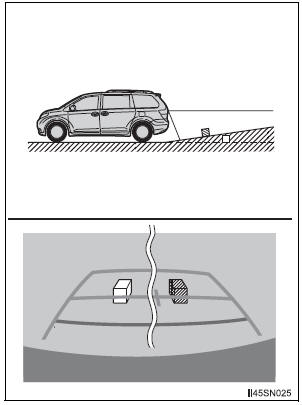
- When the ground behind the vehicle slopes down sharply The distance guide lines will appear to be further from the vehicle than the actual distance.
Because of this, objects will appear to be closer than they actually are.
In the same way, there will be a margin of error between the guide lines and the actual distance/course on the road
- When any part of the vehicle sags When any part of the vehicle sags due to the number of passengers or the distribution of the load, there is a margin of error between the fixation guide lines on the screen and the actual distance/ course on the road.
When approaching three-dimensional objects
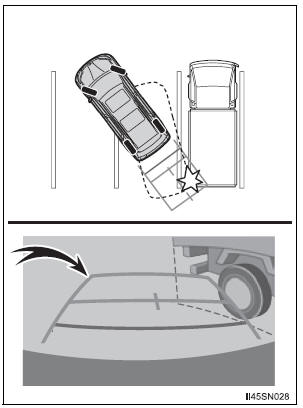
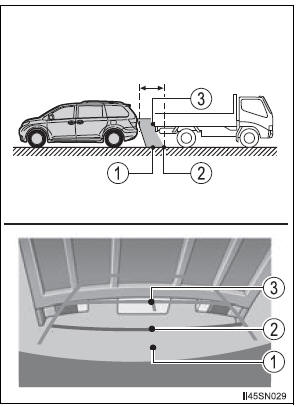
The distance guide lines are displayed according to flat surfaced objects (such as the road). It is not possible to determine the position of three-dimensional objects (such as vehicles) using the distance guide lines. When approaching a three-dimensional object that extends outward (such as the flatbed of a truck), be careful of the following.
- Vehicle width guide lines Visually check the surroundings and the area behind the vehicle. In the case shown in the illustration, the truck appears to be outside of the vehicle width guide lines and the vehicle does not look as if it hits the truck. However, the rear body of the truck may actually cross over the vehicle width guide lines. In reality if you back up as guided by the vehicle width guide lines, the vehicle may hit the truck.
- Distance guide lines Visually check the surroundings and the area behind the vehicle. On the screen, it appears that a truck is parking at point 2. However, in reality if you back up to point 1, you will hit the truck. On the screen, it appears that 1 is closest and 3 is farthest away. However, in reality, the distance to 1 and 3 is the same, and 2 is farther than 1 and 3.
Things you should know
If you notice any symptoms
If you notice any of the following symptoms, refer to the likely cause and the solution, and re-check.
If the symptom is not resolved by the solution, have the vehicle inspected by your Toyota dealer.
|
Likely cause |
Solution |
|
|
|
If this happens due to these causes, it does not indicate a malfunction.
Back up while visually checking the vehicle’s surroundings. (Use the monitor again once conditions have been improved.) The image on the rear view monitor system can be adjusted. |
|
|
| Dirt or foreign matter (such as water droplets, snow, mud, etc.) is adhering to the camera | Flush the camera with a large quantity of water and wipe the camera lens clean with a soft and wet cloth. |
|
|
| The camera or surrounding area has received a strong impact | Have the vehicle inspected by your Toyota dealer. |
|
|
| The camera position is out of alignment. | Have the vehicle inspected by your Toyota dealer |
|
If this happens due to these causes, it does not indicate a malfunction.
Back up while visually checking the vehicle’s surroundings. |
| WARNING
When using the rear view monitor system The rear view monitor system is a supplemental device intended to assist the driver when backing up. When backing up, be sure to check visually behind and all around the vehicle before proceeding. Observe the following precautions to avoid an accident that could result in death or serious injuries.
|
| NOTICE
How to use the camera
|
Driving assist systems
To help enhance driving safety and performance, the following systems operate automatically in response to various driving situations. Be aware, however, that these systems are supplementary and should not be relied upon too heavily when operating the vehicle.
ABS (Anti-lock Brake System)
Helps to prevent wheel lock when the brakes are applied suddenly, or if the brakes are applied while driving on a slippery road surface
Brake assist
Generates an increased level of braking force after the brake pedal is depressed when the system detects a panic stop situation
VSC (Vehicle Stability Control)
Helps the driver to control skidding when swerving suddenly or turning on slippery road surfaces
TRAC (Traction Control)
Helps to maintain drive power and prevent the drive wheels from spinning when starting the vehicle or accelerating on slippery roads
Hill-start assist control (if equipped)
Helps to prevent the vehicle from rolling backward when starting on an incline or slippery slope
EPS (Electric Power Steering)
Employs an electric motor to reduce the amount of effort needed to turn the steering wheel
Active Torque Control 4WD (AWD models only)
Automatically switches from front-wheel drive to AWD (All-Wheel Drive) according to driving conditions, helping to ensure reliable handling and stability. Examples of conditions where the system will switch to AWD are when cornering, going uphill, starting off or accelerating, and when the road surface is slippery due to snow or rain etc.
VDIM (Vehicle Dynamics Integrated Management) (if equipped)
Provides integrated control of the ABS, brake assist, TRAC, VSC, hill-start assist control, and EPS systems Helps to maintain vehicle stability when swerving on slippery road surfaces by controlling the brakes and engine output
PCS (Pre-Collision System) (if equipped)
When the TRAC/VSC systems are operating
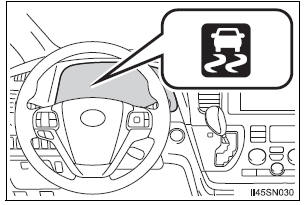
The slip indicator light will flash while the TRAC/VSC systems are operating.
Disabling TRAC system
If the vehicle gets stuck in mud, dirt or snow, the TRAC system may reduce power from the engine to the wheels. Pressing  to turn the
system off may make it easier for you to rock the vehicle in order to free it.
To turn the TRAC system off, quickly press and release  .
.
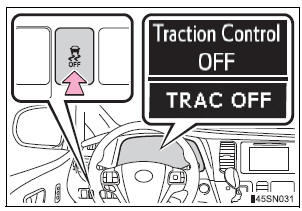
The “Traction Control OFF”/“TRAC OFF” will be shown on the multiinformation display.
Press  again to turn the system
back on.
Turning off both TRAC and VSC systems
To turn the TRAC and VSC systems off, press and hold  for more than 3
seconds while the vehicle is stopped.
The VSC OFF indicator light will come on and the “Traction Control OFF”/ “TRAC OFF” will be shown on the multi-information display.
Press again to turn the
systems back on.
When the message is displayed on the multi-information display showing that TRAC has been disabled even if 
has not been pressed
TRAC and hill-start assist control (if equipped) cannot be operated. Contact your Toyota dealer.
Sounds and vibrations caused by ABS, brake assist, TRAC, VSC and hill-start assist control (if equipped) systems
- A sound may be heard from the engine compartment when the brake pedal is depressed repeatedly, when the engine is started or just after the vehicle begins to move. This sound does not indicate that a malfunction has occurred in any of these systems.
- Any of the following conditions may occur when the above systems are operating. None of these indicates that a malfunction has occurred.
- Vibrations may be felt through the vehicle body and steering.
- A motor sound may be heard after the vehicle comes to a stop.
- The brake pedal may pulsate slightly after ABS is activated.
- The brake pedal may move down slightly after ABS is activated.
- EPS operation sound
When the steering wheel is operated, a motor sound (whirring sound) may be heard. This does not indicate a malfunction.
Automatic reactivation of TRAC and VSC systems
After turning the TRAC and VSC systems off, the systems will be automatically re-enabled in the following situations:
- When the engine switch is turned to the “LOCK” position (vehicles without a smart key system) or off (vehicles with a smart key system).
- If only the TRAC system is turned off, the TRAC will turn on when vehicle speed increases If both the TRAC and VSC systems are turned off, automatic re-enabling will not occur when vehicle speed increases.
Reduced effectiveness of the EPS system
The effectiveness of the EPS system is reduced to prevent the system from overheating when there is frequent steering input over an extended period of time. The steering wheel may feel heavy as a result. Should this occur, refrain from excessive steering input or stop the vehicle and turn the engine off. The EPS system should return to normal within 10 minutes.
Operating conditions of hill-start assist control (vehicles with a hill-start assist control system)
When the following four conditions are met, the hill-start assist control will operate:
- The shift lever is in a position other than P or N (when starting off forward/ backward on an upward incline).
- The vehicle is stopped.
- The accelerator pedal is not depressed.
- The parking brake is not applied.
Automatic system cancelation of hill-start assist control (vehicles with a hill-start assist control system)
The hill-start assist control will turn off in any of the following situations:
- The shift lever is shifted to P or N.
- The accelerator pedal is depressed.
- The parking brake is applied.
- Approximately 2 seconds elapse after the brake pedal is released.
| WARNING
The ABS does not operate effectively when
Stopping distance when the ABS is operating may exceed that of normal conditions The ABS is not designed to shorten the vehicle’s stopping distance. Always maintain a safe distance from the vehicle in front of you, especially in the following situations:
TRAC may not operate effectively when Directional control and power may not be achievable while driving on slippery road surfaces, even if the TRAC system is operating. Drive the vehicle carefully in conditions where stability and power may be lost. Hill-start assist control (vehicles with a hill-start assist control system)
When the VSC is activated The slip indicator light flashes. Always drive carefully. Reckless driving may cause an accident. Exercise particular care when the indicator light flashes. When the TRAC/VSC systems are turned off Be especially careful and drive at a speed appropriate to the road conditions. As these are the systems to help ensure vehicle stability and driving force, do not turn the TRAC/VSC systems off unless necessary. Replacing tires Make sure that all tires are of the specified size, brand, tread pattern and total load capacity. In addition, make sure that the tires are inflated to the recommended tire inflation pressure level. The ABS, TRAC and VSC systems will not function correctly if different tires are installed on the vehicle. Contact your Toyota dealer for further information when replacing tires or wheels. Handling of tires and suspension Using tires with any kind of problem or modifying the suspension will affect the driving assist systems, and may cause the system to malfunction. Active Torque Control 4WD system (AWD models only)
|
PCS (Pre-Collision System)
When the radar sensor detects possibility of a frontal collision, the pre-collision system such as the brakes and seat belts are automatically engaged to lessen impact as well as vehicle damage.
Pre-collision warning
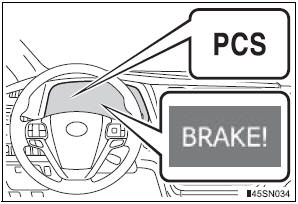
When a high possibility of a frontal collision is detected, the pre-collision system warning light flashes, a buzzer sounds and a message is shown on the multi-information display to urge the driver to take evasive action.
Pre-collision seat belts (front seat belts only) If the pre-collision sensor detects that a collision is unavoidable, the pre-collision system will retract the seat belt before the collision occurs. The same will happen if the driver makes an emergency braking or loses control of the vehicle. However, when the VSC system is disabled, the system will not operate in the event of skidding.
Pre-collision brake assist
When there is a high possibility of a frontal collision, the system applies greater braking force in relation to how strongly the brake pedal is depressed.
The system may not warn the driver using a warning light, warning display and buzzer when the system detects and judges braking operations.
Pre-collision braking
When there is a high possibility of a frontal collision, the system warns the driver using a warning light, warning display and buzzer.
If the system determines that a collision is unavoidable, the brakes are automatically applied to reduce the collision speed. Pre-collision braking can be disabled using the pre-collision braking off switch.
Disabling pre-collision braking

- Pre-collision braking disabled
- Pre-collision braking enabled
The pre-collision system warning light will turn on when pre-collision braking is disabled.
Radar sensor

The radar sensor detects vehicles or other obstacles on or near the road ahead and determines whether a collision is imminent based on the position, speed, and heading of the obstacles.
The pre-collision system is operational when
- Pre-collision seat belts (type A):
- Vehicle speed is greater than about 4 mph (5 km/h).
- The speed at which your vehicle is approaching the obstacle or the vehicle running ahead of you is greater than about 19 mph (30 km/h).
- The front occupants are wearing a seat belt.
- Pre-collision seat belts (type B):
- Vehicle speed is greater than about 19 mph (30 km/h).
- The system detects sudden braking or skidding.
- The front occupants are wearing a seat belt.
- Pre-collision brake assist:
- Vehicle speed is greater than about 19 mph (30 km/h).
- The speed at which your vehicle is approaching the obstacle or the vehicle running ahead of you is greater than about 19 mph (30 km/h).
- The brake pedal is depressed.
- Pre-collision braking:
- The pre-collision braking off switch is not pressed.
- Vehicle speed is greater than about 10 mph (15 km/h).
- The speed at which your vehicle is approaching the obstacle or the vehicle running ahead of you is greater than about 10 mph (15 km/h).
Conditions that may trigger the system even if there is no possibility of a collision
In any of the following situations where the frontal area of the radar sensor is interrupted, the radar sensor may detect possibility of a frontal collision and the system may be activated.
- When passing by an oncoming vehicle in a curve or a turn to the right or the left.
- When rapidly approaching an obstacle ahead (e.g. preceding vehicle, toll gate barrier, etc.)
- When there is a structural object (billboard, low ceiling, fluorescent light, etc.) above the uphill road ahead
- When driving on a narrow road or through under a low overhead structure (bridge, tunnel, fly-under, etc.)
- When driving on an uneven road surface
- When there is a metal object, bump, or protrusion on the road surface
- When vehicle’s front part is raised or lowered depending on loading conditions
- When the direction of radar sensor is misaligned by strong impact applied on an area around the radar sensor, etc.
- When there is an obstacle (guard rail, etc.) by the roadside at the entrance to a curve
- When the front of your vehicle is pointing upwards (caused by towing a trailer, during emergency towing or putting a heavy load in the luggage compartment etc.)
When the system is activated in the situations described above, there is also a possibility that the seat belts will retract quickly and the brakes may be applied with a force greater than normal. When the seat belt is locked in the retracted position, stop the vehicle in a safe place, release the seat belt and refasten it.
Obstacles not detected
The sensor cannot detect plastic obstacles such as traffic cones. There may also be occasions when the radar sensor cannot detect pedestrians, animals, bicycles, motorcycles, trees, or snowdrifts.
Situations in which the pre-collision system does not function properly
The system may not function effectively in situations such as the following:
- On roads with sharp bends or uneven surfaces
- If a vehicle suddenly moves in front of your vehicle, such as at an intersection
- If a vehicle suddenly cuts in front of your vehicle, such as when overtaking
- In inclement weather such as heavy rain, fog, snow or sand storms
- When your vehicle is skidding such as the VSC system off
- When an extreme change in vehicle height occurs
- When the axis of the radar is out of adjustment
Automatic cancelation of the pre-collision system
When a malfunction occurs due to sensor contamination, etc. that results in the sensors being unable to detect obstacles, the pre-collision system will be automatically disabled. In this case, the system will not activate even if there is a collision possibility.
When there is a malfunction in the system, or if the system is temporarily unavailable
The pre-collision system warning light will come on or flash, and warning messages will displayed. (, 556)
Certification
- For vehicles sold in the U.S.A.
FCC ID: HYQDNMWR004
This device complies with part 15 of the FCC Rules. Operation is subject to the following two conditions: (1) This device may not cause harmful interference, and (2) this device must accept any interference received, including interference that may cause undesired operation.
FCC WARNING
Changes or modifications not expressly approved by the party responsible for compliance could void the user’s authority to operate the equipment.
Radiofrequency radiation exposure Information: This equipment complies with FCC radiation exposure limits set forth for an uncontrolled environment.
This equipment should be installed and operated with minimum distance of 20 cm between the radiator (antenna) and your body.
This transmitter must not be co-located or operating in conjunction with any other antenna or transmitter.
- For vehicles sold in Canada
This device complies with Industry Canada licence-exempt RSS standards.
Operation is subject to the following two conditions: (1) this device may not cause interference, and (2) this device must accept any interference, including interference that may cause undesired operation of the device.
| WARNING
Limitations of the pre-collision system The driver is solely responsible for safe driving. Always drive safely, taking care to observe your surroundings. Do not use the pre-collision system instead of normal braking operations under any circumstances. This system will not prevent collisions or lessen damage or injuries in all cases. Do not overly rely on this system. Failure to do so may cause an accident, resulting in death or serious injury. This system has been designed to help avoid and reduce the impact of collisions. However, the system operates differently depending on the situation (, 301). As a result, the same level of performance may not be expected in all cases. Also, the pre-collision brakes may not operate if the driver is depressing the brake pedal or turning the steering wheel, as the system will determine such conditions as collision avoidance operations. Cautions regarding the assist contents of the system By means of alarms and brake control, the pre-collision system is intended to assist the driver in avoiding collisions through the process of LOOKJUDGE- ACT. There are limits to the degree of assistance the system can provide, so please keep in mind the following important points.
When the sensor may not be correctly detecting the vehicle ahead Apply the brakes as necessary in any of the following situations.
Handling the radar sensor Observe the following to ensure the pre-collision system can function effectively:
|
BSM (Blind Spot Monitor)
Summary of the Blind Spot Monitor
The Blind Spot Monitor is a system that has 2 functions:
- The Blind Spot Monitor function Assists the driver in making the decision when changing lanes
- The Rear Cross Traffic Alert function Assists the driver when backing up
These functions use same sensors.
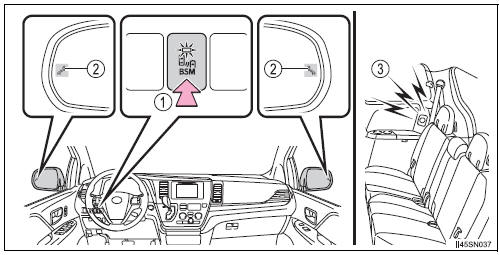
- BSM main switch
Pressing the switch turns the system on or off. When the switch is set to on, the switch’s indicator illuminates. Common switch for Blind Spot Monitor function and Rear Cross Traffic Alert function. - Outside rear view mirror indicator Blind Spot Monitor function: When a vehicle is detected in the blind spot, the outside rear view mirror indicator comes on while the turn signal lever is not operated and the outside rear view mirror indicator flashes while the turn signal lever is operated.
Rear Cross Traffic Alert function: When a vehicle approaching from the right or left rear of the vehicle is detected, the outside rear view mirror indicators flash.
- Rear Cross Traffic Alert buzzer (Rear Cross Traffic Alert function only)
When a vehicle approaching from the right or left rear of the vehicle is detected, a buzzer sounds from behind the rear seat.
The outside rear view mirror indicators visibility
When under strong sunlight, the outside rear view mirror indicator may be difficult to see.
Rear Cross Traffic Alert buzzer hearing
Rear Cross Traffic Alert function may be difficult to hear over loud noises such as high audio volume.
When there is a malfunction in the Blind Spot Monitor system
If a system malfunction is detected due to any of the following reasons, warning message will be displayed:
- There is a malfunction with the sensors
- The sensors have become dirty
- The outside temperature is extremely high or low
- The sensor voltage has become abnormal
Certification for the Blind Spot Monitor system
- For vehicles sold in the U.S.A.
FCC ID: OAYSRR2A
This device complies with part 15 of the FCC Rules. Operation is subject to the following two conditions: (1) This device may not cause harmful interference, and (2) this device must accept any interference received, including interference that may cause undesired operation.
FCC WARNING
Changes or modifications not expressly approved by the party responsible for compliance could void the user’s authority to operate the equipment.
- For vehicles sold in Canada
Applicable law: Canada 310 This device complies with Industry Canada licence-exempt RSS standard(s).
Operation is subject to the following two conditions: (1) this device may not cause interference, and (2) this device must accept any interference, including interference that may cause undesired operation of the device.
Frequency bands: 24.05-24.25 GHz Output power: less than 20 milliwatts
| WARNING
Handling the radar sensor One Blind Spot Monitor sensor is installed inside the left and right side of the vehicle rear bumper respectively. Observe the following to ensure the Blind Spot Monitor can function correctly.
|
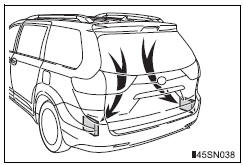
The Blind Spot Monitor function
The Blind Spot Monitor function uses radar sensors to detect vehicles that are traveling in an adjacent lane in the area that is not reflected in the outside rear view mirror (the blind spot), and advises the driver of the vehicles existence via the outside rear view mirror indicator.
The Blind Spot Monitor function detection areas
The areas that vehicles can be detected in are outlined below.
The range of the detection area extends to:
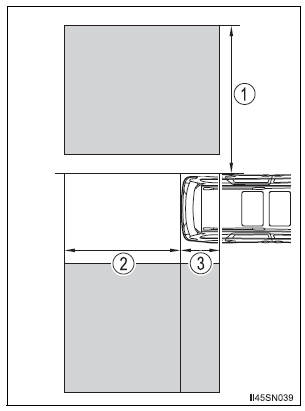
- Approximately 11.5 ft. (3.5 m) from the side of the vehicle The first 1.6 ft. (0.5 m) from the side of the vehicle is not in the detection area
- Approximately 9.8 ft. (3 m) from the rear bumper
- Approximately 3.3 ft. (1 m) forward of the rear bumper
| WARNING
Cautions regarding the use of the system The driver is solely responsible for safe driving. Always drive safely, taking care to observe your surroundings. The Blind Spot Monitor function is a supplementary function which alerts the driver that a vehicle is present in the blind spot. Do not overly rely on the Blind Spot Monitor function. The function cannot judge if it is safe to change lanes, therefore over reliance could cause an accident resulting in death or serious injury. According to conditions, the system may not function correctly. Therefore the driver’s own visual confirmation of safety is necessary. |
The Blind Spot Monitor function is operational when
- The BSM main switch is set to on
- Vehicle speed is greater than approximately 10 mph (16 km/h).
The Blind Spot Monitor function will detect a vehicle when
- A vehicle in an adjacent lane overtakes your vehicle.
- Another vehicle enters the detection area when it changes lanes.
Conditions under which the Blind Spot Monitor function will not detect a vehicle
The Blind Spot Monitor function is not designed to detect the following types of vehicles and/or objects:
- Small motorcycles, bicycles, pedestrians etc.*
- Vehicles traveling in the opposite direction
- Guardrails, walls, signs, parked vehicles and similar stationary objects*
- Following vehicles that are in the same lane*
- Vehicles driving 2 lanes across from your vehicle*
*: Depending on conditions, detection of a vehicle and/or object may occur.
Conditions under which the Blind Spot Monitor function may not function correctly
- The Blind Spot Monitor function may not detect vehicles correctly in the following conditions:
- During bad weather such as heavy rain, fog, snow etc.
- When ice or mud etc. is attached to the rear bumper
- When driving on a road surface that is wet due to rain, standing water etc.
- When there is a significant difference in speed between your vehicle and the vehicle that enters the detection area
- When a vehicle is in the detection area from a stop and remains in the detection area as your vehicle accelerates
- When driving up or down consecutive steep inclines, such as hills, a dip in the road etc.
- When multiple vehicles approach with only a small gap between each vehicle
- When vehicle lanes are wide, and the vehicle in the next lane is too far away from your vehicle
- When the vehicle that enters the detection area is traveling at about the same speed as your vehicle
- When there is a significant difference in height between your vehicle and the vehicle that enters the detection area
- Directly after the BSM main switch is set to on
- When towing a trailer
- When items such as a bicycle carrier are installed on the rear of the vehicle
- Instances of the Blind Spot Monitor function unnecessarily detecting a vehicle and/or object may increase under the following conditions:
- When there is only a short distance between your vehicle and a guardrail, wall etc.
- When there is only a short distance between your vehicle and a following vehicle
- When vehicle lanes are narrow and a vehicle driving 2 lanes across from your vehicle enters the detection area
- When items such as a bicycle carrier are installed on the rear of the vehicle.
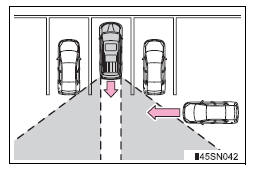
The Rear Cross Traffic Alert function
The Rear Cross Traffic Alert functions when your vehicle is in reverse.
It can detect other vehicles approaching from the right or left rear of the vehicle. It uses radar sensors to alert the driver of the other vehicle’s existence through flashing the outside rear view mirror indicators and sounding a buzzer.

- Approaching vehicles
- Detection areas
| WARNING
Cautions regarding the use of the system The driver is solely responsible for safe driving. Always drive safely, taking care to observe your surroundings. The Rear Cross Traffic Alert function is only an assist and is not a replacement for careful driving. Driver must be careful when backing up, even when using Rear Cross Traffic Alert function. The driver’s own visual confirmation of behind you and your vehicle is necessary and be sure there are no pedestrians, other vehicles etc. before backing up. Failure to do so could cause death or serious injury. According to conditions, the system may not function correctly. Therefore the driver’s own visual confirmation of safety is necessary. |
The Rear Cross Traffic Alert function detection areas
The areas that vehicles can be detected in are outlined below.
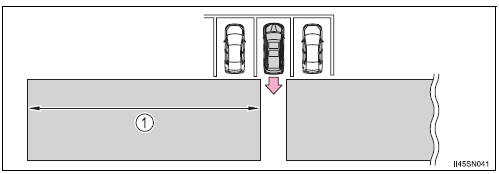
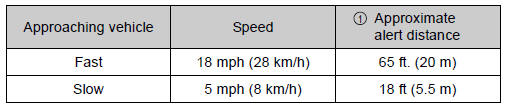
To give the driver a more consistent time to react, the buzzer can alert for faster vehicles from farther away.
Example:
The Rear Cross Traffic Alert function is operational when
- The BSM main switch is set to on.
- The shift lever is in R.
- Vehicle speed is less than approximately 5 mph (8 km/h).
- Approaching vehicle speed is between approximately 5 mph (8 km/h) and 18 mph (28 km/h).
Conditions under which the Rear Cross Traffic Alert function will not detect a vehicle
The Rear Cross Traffic Alert function is not designed to detect the following types of vehicles and/or objects.
- Small motorcycles, bicycles, pedestrians etc.*
- Vehicles approaching from directly behind
- Guardrails, walls, signs, parked vehicles and similar stationary objects*
- Vehicles moving away from your vehicle
- Vehicles approaching from the parking spaces next to your vehicle*
- Vehicles backing up in the parking space next to your vehicle
- Vehicles passing quickly through the detection area
*: Depending on conditions, detection of a vehicle and/or object may occur.
Conditions under which the Rear Cross Traffic Alert function may not function correctly
The Rear Cross Traffic Alert function may not detect vehicles correctly in the following conditions:
- When ice or mud etc. is attached to the rear bumper
- During bad weather such as heavy rain, fog, snow etc.
- When multiple vehicles approach continuously
- Shallow angle parking
- When a vehicle is approaching at high speed
- When parking on a steep incline, such as hills, a dip in the road etc.
- Directly after the BSM main switch is set to on
- When towing a trailer
- Vehicles that the sensors cannot detect because of obstacles
Stored owner’s manualImported HTML from the shared Autotk manuals tables. Not an official Toyota site.