2022 Toyota Sienna Owner’s Manual — Driving procedures
Driving
Engine (ignition) switch (vehicles without a smart key system)
Starting the engine
- Check that the parking brake is set.
- Check that the shift lever is set in P.
- Firmly depress the brake pedal.
- Turn the engine switch to the “START” position to start the engine.
Changing the engine switch positions
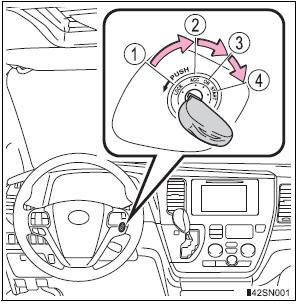
- “LOCK”
The steering wheel is locked and the key can be removed. (The key can be removed only when the shift lever is in “P”.) - “ACC”
Some electrical components such as the audio system can be used. - “ON”
All electrical components can be used. - “START”
For starting the engine.
Turning the key from “ACC” to “LOCK”
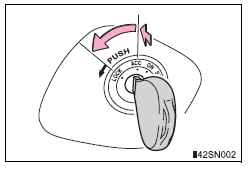
- Shift the shift lever to P.
- Push in the key and turn it to the “LOCK” position.
If the engine does not start
The engine immobilizer system may not have been deactivated. Contact your Toyota dealer.
When the steering lock cannot be released
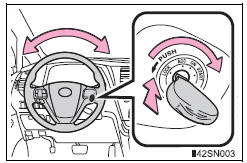
When starting the engine, the engine switch may seem stuck in the “LOCK” position. To free it, turn the key while turning the steering wheel slightly left and right.
Key reminder function
A buzzer sounds if the driver’s door is opened while the engine switch is in the “LOCK” or “ACC” position to remind you to remove the key.
| WARNING
When starting the engine Always start the engine while sitting in the driver’s seat. Do not depress the accelerator pedal while starting the engine under any circumstances. Doing so may cause an accident resulting in death or serious injury. Caution when driving Do not turn the engine switch to the “LOCK” position while driving. If, in an emergency, you must turn the engine off while the vehicle is moving, turn the engine switch only to the “ACC” position to stop the engine. An accident may result if the engine is stopped while driving. |
| NOTICE
To prevent battery discharge Do not leave the engine switch in the “ACC” or “ON” position for long periods of time without the engine running. When starting the engine
|
Engine (ignition) switch (vehicles with a smart key system)
Performing the following operations when carrying the electronic key on your person starts the engine or changes engine switch modes.
Starting the engine
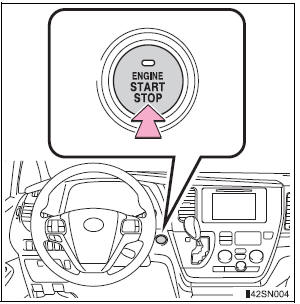
- Check that the parking brake is set.
- Check that the shift lever is set in P.
- Firmly depress the brake pedal.
The engine switch indicator will turn green. If the indicator does not turn green, the engine cannot be started.
- Press the engine switch.
The engine will crank until it starts or for up to 30 seconds, whichever is less.
Continue depressing the brake pedal until the engine is completely started.
The engine can be started from any engine switch mode.
Stopping the engine
- Stop the vehicle.
- Shift the shift lever to P.
- Set the parking brake.
- Press the engine switch.
- Release the brake pedal and check that the indicator on the engine switch is off.
Changing engine switch modes
Modes can be changed by pressing the engine switch with the brake pedal released. (The mode changes each time the switch is pressed.)
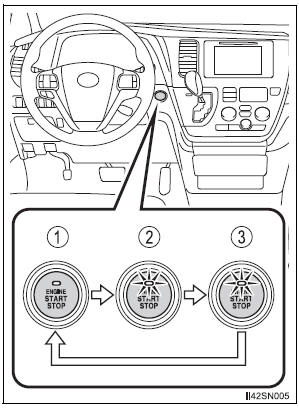
- Off*
Emergency flashers can be used. - ACCESSORY mode
Some electrical components such as the audio system can be used.The engine switch indicator turns amber.
- IGNITION ON mode
All electrical components can be used.The engine switch indicator turns amber.
*: If the shift lever is in a position other than P when turning off the engine, the engine switch will be turned to ACCESSORY mode, not to off.
When stopping the engine with the shift lever in a position other than P
If the engine is stopped with the shift lever in a position other than P, the engine switch will not be turned off but instead be turned to ACCESSORY mode. Perform the following procedure to turn the switch off:
- Check that the parking brake is set.
- Shift the shift lever to P.
- Check that the indicator on the engine switch is illuminated in amber and then press the engine switch once.
- Check that the indicator on the engine switch is off.
Auto power off function If the vehicle is left in ACCESSORY mode for more than 20 minutes or IGNITION ON mode (the engine is not running) for more than an hour with the shift lever in P, the engine switch will automatically turn off. However, this function cannot entirely prevent battery discharge. Do not leave the vehicle with the engine switch in ACCESSORY or IGNITION ON mode for long periods of time when the engine is not running.
Electronic key battery depletion
Conditions affecting operation
Note for the entry function
If the engine does not start
The engine immobilizer system may not have been deactivated. Contact your Toyota dealer.
Steering lock
After turning the engine switch off and opening and closing the doors, the steering wheel will be locked due to the steering lock function.
Operating the engine switch again automatically cancels the steering lock.
When the steering lock cannot be released

The green indicator light on the engine switch will flash and a message will be shown on the multi-information display.
Press the engine switch while turning the steering wheel left and right.
Steering lock motor overheating prevention
To prevent the steering lock motor from overheating, the motor may be suspended if the engine is turned on and off repeatedly in a short period of time.
In this case, refrain from operating the engine. After about 10 seconds, the steering lock motor will resume functioning.
When the engine switch indicator flashes in amber
The system may be malfunctioning. Have the vehicle inspected by your Toyota dealer immediately.
If the electronic key battery is depleted
Operation of the engine switch
- When operating the engine switch, one short, firm press is enough. If the switch is pressed improperly, the engine may not start or the engine switch mode may not change. It is not necessary to press and hold the switch.
- If attempting to restart the engine immediately after turning the engine switch off, the engine may not start in some cases. After turning the engine switch off, please wait a few seconds before restarting the engine.
| WARNING
When starting the engine Always start the engine while sitting in the driver’s seat. Do not depress the accelerator pedal while starting the engine under any circumstances. Doing so may cause an accident resulting in death or serious injury. Caution while driving If the vehicle begins to slide due to engine failure or other circumstances, do not lock or open the doors until the vehicle reaches a safe and complete stop. Activation of the steering lock in this circumstance may lead to an accident, resulting in death or serious injury. Stopping the engine in an emergency If you want to stop the engine in an emergency while driving the vehicle, press and hold the engine switch for more than 2 seconds, or press it briefly 3 times or more in succession. However, do not touch the engine switch while driving except in an emergency. Turning the engine off while driving will not cause loss of steering or braking control, but the power assist to these systems will be lost. This will make it more difficult to steer and brake, so you should pull over and stop the vehicle as soon as it is safe to do so. |
| NOTICE
To prevent battery discharge
When starting the engine
Symptoms indicating a malfunction with the engine switch If the engine switch seems to be operating somewhat differently than usual, such as the switch sticking slightly, there may be a malfunction. Contact your Toyota dealer immediately. |
Automatic transaxle
Shifting the shift lever

 While the engine switch is in the
“ON” position (vehicles without a smart key system) or IGNITION ON mode (vehicles with a smart key system), move the shift lever with the brake pedal depressed.
When shifting the shift lever between P and D, make sure that the vehicle is completely stopped.
Shift position purpose

*1: Shifting to the D position allows the system to select a gear suitable for the driving conditions. Setting the shift lever to the D position is recommended for normal driving.
*2: Selecting shift ranges using S mode restricts the upper limit of the possible gear ranges, controls engine braking forces, and prevents unnecessary upshifting.
Changing shift ranges in S mode
To enter S mode, shift the shift lever to S. Shift ranges can be selected by operating the shift lever, allowing you to drive in the shift range of your choosing. The shift range can be selected by the shift lever.
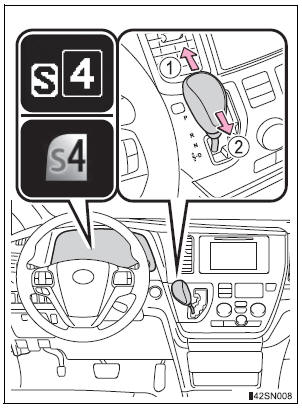
- Upshifting
- Downshifting
The selected shift range, from 1 to 6, will be displayed on the multiinformation display.
The initial shift range in S mode is set automatically to 5 or 4 according to vehicle speed. However, the initial shift range may be set to 3 if the AI-SHIFT has operated while the shift lever was in the D position.
Shift ranges and their functions
- Automatically selecting gears between 1 and 6 according to vehicle speed and driving conditions. But, the gear is limited according to selected shift range.
- You can choose from 6 levels of engine braking force.
- A lower shift range will provide greater engine braking force than a higher shift range, and the engine speed will also increase.
S mode
- When the shift range is 5 or lower, holding the shift lever toward “+” sets the shift range to 6.
- To prevent excessive engine speed, a function was adopted that automatically selects a higher shift range before the engine speed becomes too high.
- To protect the automatic transaxle, a function is adopted that automatically selects a higher shift range when the fluid temperature is high.
Downshift restriction warning buzzer (S mode)
To help ensure safety and driving performance, downshifting operation may sometimes be restricted. In some circumstances, downshifting may not be possible even when the shift lever is operated. (A buzzer will sound twice.)
When driving with the cruise control or dynamic radar cruise control activated (if equipped)
Even when performing the following actions with the intent of enabling engine braking, engine braking will not activate while driving in S mode and downshifting to 5 or 4 because cruise control or dynamic radar cruise control will not be canceled. (, 263)
If the shift lever cannot be shifted from P
- Vehicles with AUTO ACCESS SEAT: If the AUTO ACCESS SEAT has not been locked in place after being stowed, the shift lever cannot be shifted from P.
For details, refer to “AUTO ACCESS SEAT OWNER’S MANUAL”.
If “S” does not come on even after shifting the shift lever to S
This may indicate a malfunction in the automatic transaxle system. Have the vehicle inspected by your Toyota dealer immediately. (In this situation, the transaxle will operate in the same manner as when the shift lever is in D.)
AI-SHIFT
AI-SHIFT automatically selects the suitable gear according to driver performance and driving conditions.
AI-SHIFT automatically operates when the shift lever is in the D position.
(Shifting the shift lever to the S position cancels the function.)
| WARNING
When driving on slippery road surfaces Do not accelerate or shift gears suddenly. Sudden changes in engine braking may cause the vehicle to spin or skid, resulting in an accident. |
Turn signal lever
Operating instructions
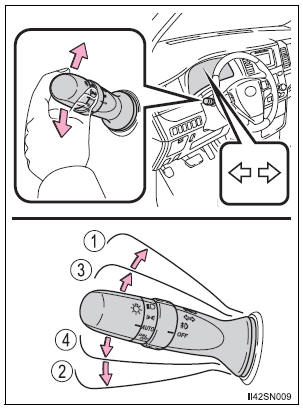
- Right turn
- Left turn
- Lane change to the right (move the lever partway and release it) The right hand signals will flash 3 times.
- Lane change to the left (move the lever partway and release it) The left hand signals will flash 3 times.
Turn signals can be operated when
The engine switch is in the “ON” position (vehicles without a smart key system) or IGNITION ON mode (vehicles with a smart key system).
If the indicator flashes faster than usual
Check that a light bulb in the front or rear turn signal lights has not burned out.
If the turn signals stop flashing before a lane change has been performed
Operate the lever again.
To discontinue flashing of the turn signals during a lane change
Operate the lever in the opposite direction.
Parking brake
Operating instructions
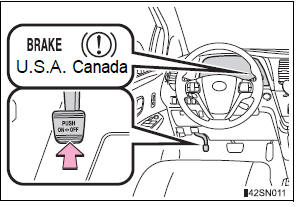
To set the parking brake, fully depress the parking brake pedal with your left foot while depressing the brake pedal with your right foot.
(Depressing the pedal again releases the parking brake.)
Usage in winter time
| NOTICE
Before driving Fully release the parking brake. Driving the vehicle with the parking brake set will lead to brake components overheating, which may affect braking performance and increase brake wear. |
Stored owner’s manualImported HTML from the shared Autotk manuals tables. Not an official Toyota site.