2022 Toyota Sienna Owner’s Manual — Using the other interior features
Interior features
Other interior features
Sun visors

- To set the visor in the forward position, flip it down.
- To set the visor in the side position, flip down, unhook, and swing it to the side.
- To use the side extender, place the visor in the side position, then slide it backward.
Vanity mirrors
Open the cover.
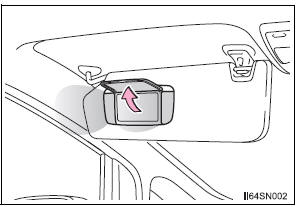
The light turns on when the cover is opened
To prevent battery discharge
If the vanity lights remain on for 20 minutes while the engine is off, the lights will turn off automatically.
Clock
- Vehicles with an Entune Audio
- Vehicles with an Entune Audio Plus or Entune Premium Audio with Navigation

Refer to the “NAVIGATION AND MULTIMEDIA SYSTEM OWNER’S MANUAL”.
Conversation mirror

- Push the lid and allow the lid to open.
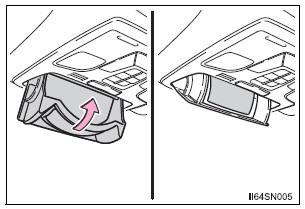
- Push the lid. To first locked position.
Power outlets
The power outlet can be used for the following components: 12 V: Accessories that run on less than 10 A 120 V AC: Accessories that use less than 100 W
12 V
Open the cover.
- Center panel type A
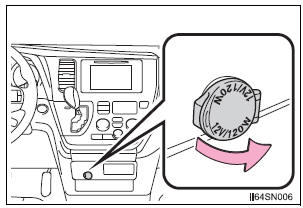
- Center panel type B

- Luggage compartment
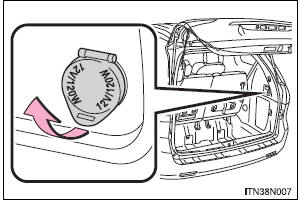
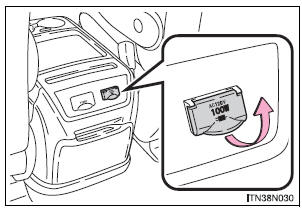
120 V AC (if equipped)
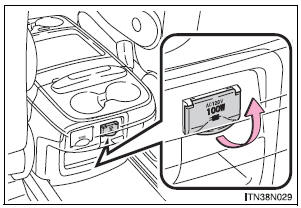
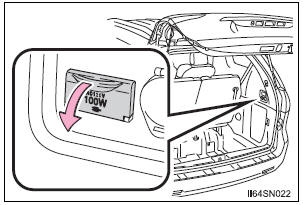
Open the cover.
- Power outlet socket console box type A
- Power outlet socket console box type B
- Power outlet socket luggage compartment
The power outlet can be used when
- Vehicles without a smart key system 12 V: The engine switch is in the “ACC” or “ON” position.
120 V AC: The engine switch is in the “ON” position.
- Vehicles with a smart key system 12 V: The engine switch is in ACCESSORY or IGNITION ON mode.
120 V AC: The engine switch is in IGNITION ON mode.
| NOTICE
To avoid damaging the power outlet Close the power outlet lid when the power outlet is not in use. Foreign objects or liquids that enter the power outlet may cause a short circuit. To prevent blown fuse
To prevent battery discharge Do not use the power outlet longer than necessary when the engine is not running. Appliances that may not operate properly (120 V AC) The following 120 V AC appliances may not operate properly even if their power consumption is under 100 W:
|
Armrests
Pull the armrest down for use.
- Front seat
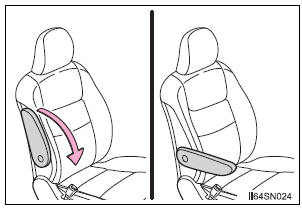
- Second seat (if equipped)
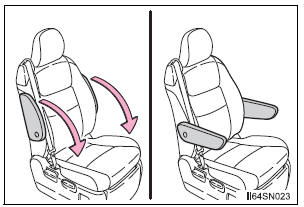
Adjusting the front seat armrests (if equipped)
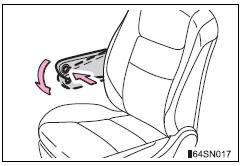
Push the armrest down while pressing the button.
| NOTICE To prevent damage to the armrest, do not apply too much load on the armrest. |
Assist grips
- Type A
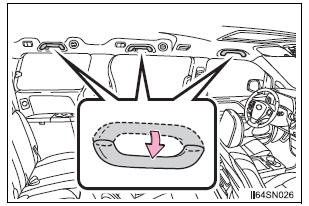
An assist grip installed on the ceiling can be used to support your body while sitting on the seat.
- Type B
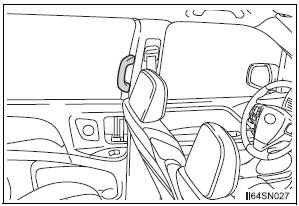
An assist grip installed on the pillar can be used when getting in or out of the vehicle and others.
| WARNING Type A: Do not use the assist grip when getting in or out of the vehicle or rising from your seat. |
| NOTICE To prevent damage to the assist grip, do not hang any heavy object or put a heavy load on the assist grip. |
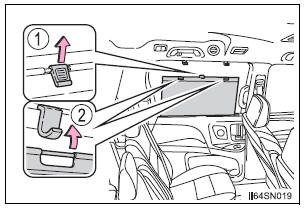
Rear side sunshades
- Rear door window
- Rear quarter window
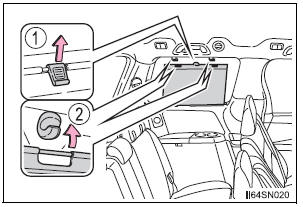
- Pull the tab up.
- Secure the sunshade using the hooks.
To retract the sunshade, pull the tab up slightly to unhook the sunshade, and lower the sunshade slowly.
NOTICE To ensure normal operation of the rear sunshades, observe the following precautions.
|
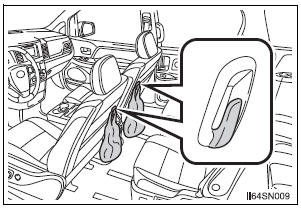
Grocery bag hooks
The hooks are designed to hang things like a grocery bag.
- Type A (front seatback) (if equipped)
- Type B (third seatback)
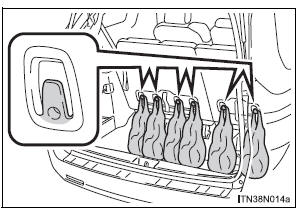
- Type C (luggage compartment)
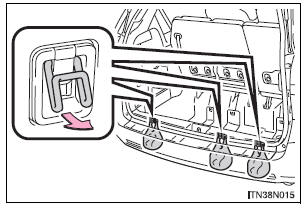
- Type D (luggage compartment)
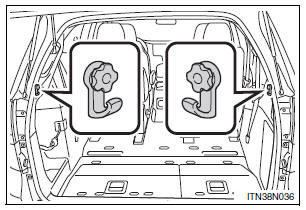
Pull the hook up.
| WARNING Type C: When not in use, keep the grocery bag hook stowed.
Injuries may result in the event of sudden braking, sudden swerving or an accident. |
| NOTICE Type A and B: Do not hang any object heavier than 8.8 lb. (4 kg) on the grocery bag hook. |
Garage door opener
The garage door opener can be programmed to operate garage doors, gates, entry doors, door locks, home lighting systems, security systems, and other devices
The garage door opener (HomeLink® Universal Transceiver) is manufactured under license from HomeLink
Programming the HomeLink® (for U.S.A. owners)
The HomeLink® compatible transceiver in your vehicle has 3 buttons which can be programmed to operate 3 different devices. Refer to the programming method below appropriate for the device.
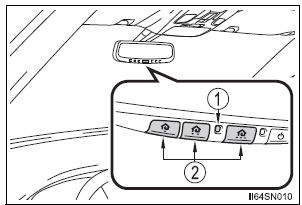
- Indicator light
- Buttons
Programming the HomeLink®
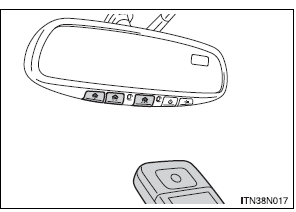
- Point the remote control for the device 1 to 3 in. (25 to 75 mm) from the HomeLink® control buttons.
Keep the indicator light on the HomeLink® in view while programming
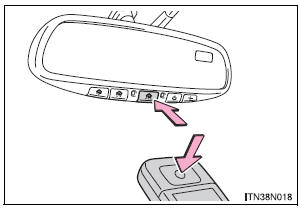
- Press and hold one of the HomeLink® buttons and the transmitter button. When the HomeLink® indicator light changes from a slow to a rapid flash, you can release both buttons.
If the HomeLink® indicator light comes on but does not flash, or flashes rapidly for 2 seconds and remains lit, the HomeLink® button is already programmed.
Use the other buttons or follow the “Reprogramming a HomeLink® button” instructions.
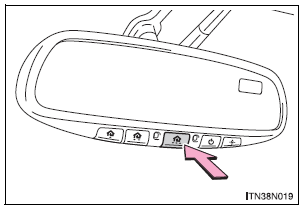
- Test the operation of the HomeLink® by pressing the newly programmed button.
If programming a garage door opener, check to see if the garage door opens and closes.
If the garage door does not operate, see if your garage transmitter is of the Rolling Code type. Press and hold the programmed HomeLink® button.
The garage door has the rolling code feature if the indicator light (on the HomeLink®) flashes rapidly for 2 seconds and then remains lit. If your transmitter is the Rolling Code type, proceed to the heading “Programming a rolling code system”.
- Repeat the steps above to program another device for each of the remaining HomeLink® buttons.
Programming a Rolling Code system (for U.S.A. owners)
If your device is Rolling Code equipped, follow the steps under the heading “Programming the HomeLink®” before proceeding with the steps listed below.
- Locate the training button on the ceiling mounted garage door opener motor. The exact location and color of the button may vary by brand of garage door opener.
Refer to the operation manual supplied with the garage door opener for the location of the training button.
- Press the training button.
Following this step, you have 30 seconds in which to initiate step 3 below.
- Press and hold the vehicle’s programmed HomeLink® button for 2 seconds and release it. Repeat this step once again. The garage door may open.
If the garage door opens, the programming process is complete. If the door does not open, press and release the button a third time. This third press and release will complete the programming process by opening the garage door.
The ceiling mounted garage door opener motor should now recognize the HomeLink® transceiver and operate the garage door.
- Repeat the steps above to program another rolling code system for any of the remaining HomeLink® buttons.
Programming an entry gate (for U.S.A. owners)/Programming all devices in the Canadian market
- Place your transmitter 1 to 3 in. (25 to 75 mm) away from the surface of the HomeLink®.
Keep the indicator light on the HomeLink® in view while programming.
- Press and hold the selected HomeLink® button.
- Repeatedly press and release (cycle) the device’s remote control button for two seconds each until step 4 is complete.
- When the indicator light on the HomeLink® compatible transceiver starts to flashing rapidly, release the buttons.
- Test the operation of the HomeLink® by pressing the newly programmed button. Check to see if the gate/device operates correctly.
- Repeat the steps above to program another device for each of the remaining HomeLink® buttons.
Programming other devices To program other devices such as home security systems, home door locks or lighting, contact your authorized Toyota dealer for assistance.
Reprogramming a button
The individual HomeLink® buttons cannot be erased but can be reprogrammed. To reprogram a button, follow the programming instructions.
Operating the HomeLink
Press the appropriate HomeLink® button. The HomeLink® indicator light on the HomeLink® transceiver should turn on.
The HomeLink® continues to send a signal for up to 20 seconds as long as the button is pressed.
Reprogramming a HomeLink® button
Press and hold the desired HomeLink® button. After 20 seconds, the HomeLink® indicator light will start flashing slowly. Keep pressing the HomeLink® button and press and hold the transmitter button until the HomeLink® indicator light changes from a slow to a rapid flash.
Release the buttons.
Erasing the entire HomeLink® memory (all three programs)
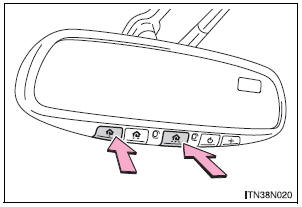
Press and hold down the 2 outside buttons for 10 seconds until the indicator light flashes.
If you sell your vehicle, be sure to erase the programs stored in the HomeLink® memory.
Before programming
- Install a new battery in the transmitter.
- The battery side of the transmitter must be pointed away from the HomeLink® button.
Certification for the garage door opener
- For vehicles sold in the U.S.A.
FCC ID: NZLWZLHL4
NOTE: This device complies with Part 15 of the FCC Rules.
Operation is subject to the following two conditions: (1) this device may not cause harmful interference, and (2) this device must accept any interference received, including interference that may cause undesired operation.
FCC WARNING: Changes or modifications not expressly approved by the party responsible for compliance could void the user’s authority to operate the equipment.
- For vehicles sold in Canada
NOTE: Operation is subject to the following two conditions: (1) this device may not cause interference, and (2) this device must accept any interference, including interference that may cause undesired operation of the device.
For additional programming assistance with your HomeLink® Universal Transceiver
| WARNING
When programming a garage door or other remote control device The garage door may operate, so ensure people and objects are out of danger to prevent potential harm. Conforming to federal safety standards Do not use the HomeLink® Compatible Transceiver with any garage door opener or device that lacks safety stop and reverse features as required by federal safety standards. This includes any garage door that cannot detect an obstruction object. A door or device without these features increases the risk of death or serious injury. |
Compass
The compass on the inside rear view mirror indicates the direction in which the vehicle is heading.
Operation
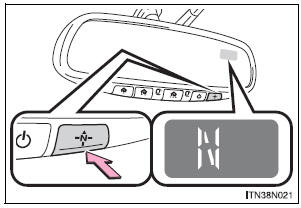
To turn the compass on or off, press the switch.
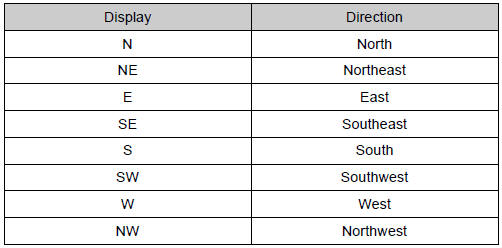
Displays and directions
Calibrating the compass
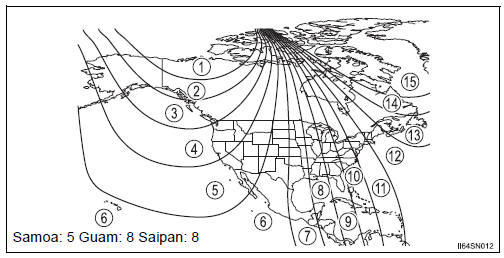
The direction display deviates from the true direction determined by the earth’s magnetic field. The amount of deviation varies according to the geographic position of the vehicle.
If you cross over a map boundary shown in illustration, the compass will deviate.
To obtain higher precision or perfect calibration, refer to the following.
Deviation calibration
- Stop the vehicle where it is safe to drive in a circle.
- Press and hold the switch.
A number (1 to 15) appears on the compass display.
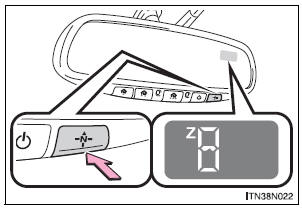
- Referring to the map above, press the switch to select the number of the zone you are in.
If the direction is displayed several seconds after adjustment, the calibration is complete.
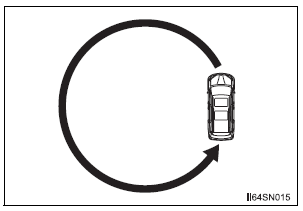
Circling calibration
When “C” appears on the display, drive the vehicle at 5 mph (8 km/h) or less in a circle until a direction is displayed.
If there is not enough space to drive in a circle, drive around the block until the direction is displayed.
Conditions unfavorable to correct operation
The compass may not show the correct direction in the following conditions:
- The vehicle is stopped immediately after turning.
- The vehicle is on an inclined surface.
- The vehicle is in a place where the earth’s magnetic field is subject to interference by artificial magnetic fields (underground car park/parking lot, under a steel tower, between buildings, roof car park/parking lot, near an intersection, near a large vehicle, etc.).
- The vehicle has become magnetized.
(There is a magnet or metal object near the inside rear view mirror.)
- The battery has been disconnected.
- A door is open.
| WARNING
While driving the vehicle Do not adjust the display. Adjust the display only when the vehicle is stopped. When doing the circling calibration Secure a wide space, and watch out for people and vehicles in the vicinity. Do not violate any local traffic rules while performing circling calibration. |
| NOTICE
To avoid compass malfunctions Do not place magnets or any metal objects near the inside rear view mirror. Doing this may cause the compass sensor to malfunction. To ensure normal operation of the compass
|
Safety Connect
Safety Connect is a subscription-based telematics service that uses Global Positioning System (GPS) data and embedded cellular technology to provide safety and security features to subscribers.
Safety Connect is supported by Toyota’s designated response center, which operates 24 hours per day, 7 days per week.
Safety Connect service is available by subscription on select, telematics hardware-equipped vehicles.
By using the Safety Connect service, you are agreeing to be bound by the Telematics Subscription Service Agreement and its Terms and Conditions, as in effect and amended from time to time, a current copy of which is available at Toyota.com. All use of the Safety Connect service is subject to such then-applicable Terms and Conditions.
System components
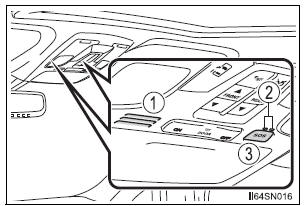
- Microphone
- LED light indicators
- “SOS” button
Services
Subscribers have the following Safety Connect services available:
- Automatic Collision Notification* Helps drivers receive necessary response from emergency service providers. *: U.S. Patent No. 7,508,298 B2
- Stolen Vehicle Location Helps drivers in the event of vehicle theft.
- Emergency Assistance Button (SOS) Connects drivers to response-center support.
- Enhanced Roadside Assistance Provides drivers various on-road assistance
Subscription
After you have signed the Telematics Subscription Service Agreement and are enrolled, you can begin receiving services.
A variety of subscription terms is available for purchase. Contact your Toyota dealer, or push the “SOS” button in your vehicle for further subscription details.
Safety Connect Services Information
- Phone calls using the vehicles Bluetooth® technology will not be possible during Safety Connect.
- Safety Connect is available beginning Fall 2009 on select Toyota models.
Contact with the Safety Connect response center is dependent upon the telematics device being in operative condition, cellular connection availability, and GPS satellite signal reception, which can limit the ability to reach the response center or receive emergency service support. Enrollment and Telematics Subscription Service Agreement are required. A variety of subscription terms is available; charges vary by subscription term selected.
- Automatic Collision Notification, Emergency Assistance, Stolen Vehicle Location, and Enhanced Roadside Assistance will function in the United States, including Hawaii and Alaska, and in Canada. No Safety Connect services will function outside of the United States in countries other than Canada.
- Safety Connect services are not subject to section 255 of the Telecommunications Act and the device is not TTY compatible.
Languages
The Safety Connect response center will offer support in multiple languages.
The Safety Connect system will offer voice prompts in English and Spanish.
Please indicate your language of choice when enrolling.
When contacting the response center
You may be unable to contact the response center if the network is busy.
Safety Connect LED light Indicators
When the engine switch is turned to the “ON” position (vehicles without a smart key system) or IGNITION ON mode (vehicles with a smart key system), the red indicator light comes on for 2 seconds then turns off. Afterward, the green indicator light comes on, indicating that the service is active.
The following indicator light patterns indicate specific system usage conditions:
- Green indicator light on = Active service
- Green indicator light flashing = Safety Connect call in process
- Red indicator light (except at vehicle start-up) = System malfunction (contact your Toyota dealer)
- No indicator light (off) = Safety Connect service not active
Safety Connect services
Automatic Collision Notification
In case of either airbag deployment or severe rear-end collision, the system is designed to automatically call the response center. The responding agent receives the vehicle’s location and attempts to speak with the vehicle occupants to assess the level of emergency.
If the occupants are unable to communicate, the agent automatically treats the call as an emergency, contacts the nearest emergency services provider to describe the situation, and requests that assistance be sent to the location.
Stolen Vehicle Location
If your vehicle is stolen, Safety Connect can work with local authorities to assist them in locating and recovering the vehicle. After filing a police report, call the Safety Connect response center at 1-800- 331-4331 and follow the prompts for Safety Connect to initiate this service.
In addition to assisting law enforcement with recovery of a stolen vehicle, Safety-Connect-equipped vehicle location data may, under certain circumstances, be shared with third parties to locate your vehicle. Further information is available at Toyota.com.
Emergency Assistance Button (“SOS”)
In the event of an emergency on the road, push the “SOS” button to reach the Safety Connect response center. The answering agent will determine your vehicle’s location, assess the emergency, and dispatch the necessary assistance required.
If you accidentally press the “SOS” button, tell the response-center agent that you are not experiencing an emergency.
Enhanced Roadside Assistance
Enhanced Roadside Assistance adds GPS data to the already included warranty-based Toyota roadside service.
Subscribers can press the “SOS” button to reach a Safety Connect response-center agent, who can help with a wide range of needs, such as: towing, flat tire, fuel delivery, etc. For a description of the Enhanced Roadside Assistance services and their limitations, please see the Safety Connect Terms and Conditions, which are available at Toyota.com.
Safety information for Safety Connect
Important! Read this information before using Safety Connect.
Exposure to radio frequency signals
The Safety Connect system installed in your vehicle is a low-power radio transmitter and receiver. It receives and also sends out radio frequency (RF) signals.
In August 1996, the Federal Communications Commission (FCC) adopted RF exposure guidelines with safety levels for mobile wireless phones. Those guidelines are consistent with the safety standards previously set by the following U.S. and international standards bodies.
- ANSI (American National Standards Institute) C95.1 [1992]
- NCRP (National Council on Radiation Protection and Measurement) Report 86 [1986]
- ICNIRP (International Commission on Non-Ionizing Radiation Protection) [1996]
Those standards were based on comprehensive and periodic evaluations of the relevant scientific literature. Over 120 scientists, engineers, and physicians from universities, and government health agencies and industries reviewed the available body of research to develop the ANSI Standard (C95.1).
The design of Safety Connect complies with the FCC guidelines in addition to those standards.
Certification for Safety Connect
FCC ID: O6Y-CDMRF101
FCC ID: XOECDMRF101B
FCC ID: N7NGTM2
NOTE: This device complies with Part 15 of the FCC Rules. Operation is subject to the following two conditions: (1) This device may not cause harmful interference, and (2) this device must accept any interference received, including interference that may cause undesired operation.
FCC WARNING: Changes or modifications not expressly approved by the party responsible for compliance could void the user’s authority to operate the equipment.
Stored owner’s manualImported HTML from the shared Autotk manuals tables. Not an official Toyota site.