2022 Toyota Sienna Owner’s Manual — Key information
Operation of each component
The keys
The following keys are provided with the vehicle.
- Vehicles without a smart key system
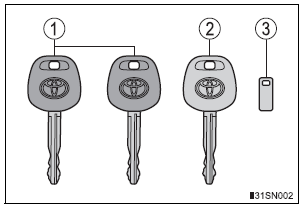
- Master keys (black)
- Valet key (gray)
- Key number plate
- Vehicles with a smart key system
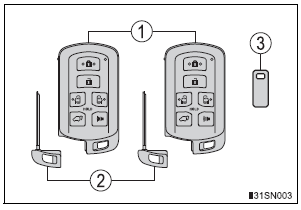
- Electronic keys
- Operating the smart key system
- Operating the wireless remote control function
- Mechanical keys
- Key number plate
Wireless remote control
- Vehicles without a smart key system (type A)
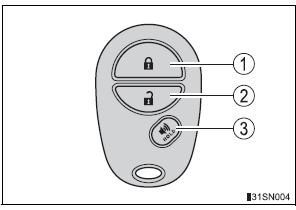
- Locks all doors
- Unlocks all doors
- Sounds the alarm
- Vehicles without a smart key system (type B)
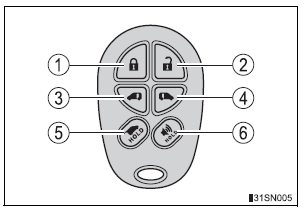
- Locks all doors
- Unlocks all doors
- Opens and closes the left side power sliding door
- Opens and closes the right side power sliding door
- Opens and closes the power back door*
- Sounds the alarm
*: If equipped
- Vehicles with a smart key system
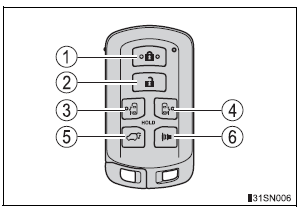
- Locks all doors
- Unlocks all doors
- Opens and closes the left side power sliding door
- Opens and closes the right side power sliding door
- Opens and closes the power back door
- Sounds the alarm
Using the mechanical key (vehicles with a smart key system)
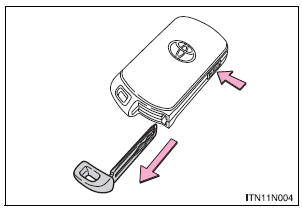
To take out the mechanical key, push the release button and take the key out.
The mechanical key can only be inserted in one direction, as the key only has grooves on one side.
If the key cannot be inserted in a lock cylinder, turn it over and reattempt to insert it.
After using the mechanical key, store it in the electronic key. Carry the mechanical key together with the electronic key. If the electronic key battery is depleted or the entry function does not operate properly, you will need the mechanical key.
Panic mode
- Vehicles without a smart key system
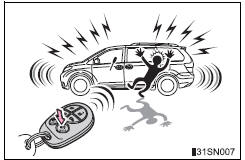
When  is pressed for longer than
about one second, an alarm will sound intermittently and the vehicle lights will flash to deter any person from trying to break into or damage your vehicle.
To stop the alarm, press any button on the wireless remote control.
- Vehicles with a smart key system
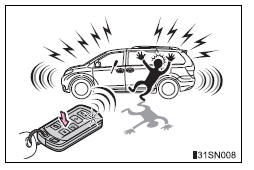
When  is pressed for longer than
about one second, an alarm will sound intermittently and the vehicle lights will flash to deter any person from trying to break into or damage your vehicle.
To stop the alarm, press any button on the electronic key.
When required to leave the vehicle’s key with a parking attendant
Lock the glove box as circumstances demand. On vehicles without the smart key system, provide the attendant with the valet key.
On vehicles with the smart key system, remove the mechanical key for your own use and provide the attendant with the electronic key only.
If you lose your keys
New genuine keys can be made by your Toyota dealer using a master key (vehicles without a smart key system) or the other key (vehicles with a smart key system) and the key number stamped on your key number plate. Keep the plate in a safe place such as your wallet, not in the vehicle.
When riding in an aircraft
When bringing a key with wireless remote control function onto an aircraft, make sure you do not press any buttons on the key while inside the aircraft cabin. If you are carrying the key in your bag etc., ensure that the buttons are not likely to be pressed accidentally. Pressing a button may cause the key to emit radio waves that could interfere with the operation of the aircraft.
Conditions affecting the operation of the smart key system or wireless remote control
Key battery depletion
- Vehicles without a smart key system If the wireless remote control function does not operate, the battery may be depleted. Replace the battery when necessary.
- Vehicles with a smart key system
- The standard battery life is 1 to 2 years.
- If the battery becomes low, an alarm will sound in the cabin when the engine stops.
- As the electronic key always receives radio waves, the battery will become depleted even if the electronic key is not used. The following symptoms indicate that the electronic key battery may be depleted. Replace the battery when necessary.
- The smart key system or the wireless remote control does not operate.
- The detection area becomes smaller.
- The LED indicator on the key surface does not turn on.
- To avoid serious deterioration, do not leave the electronic key within 3 ft.
(1 m) of the following electrical appliances that produce a magnetic field.
- TVs
- Personal computers
- Cellular phones, cordless phones and battery chargers
- Recharging cellular phones or cordless phones
- Induction cookers
- Table lamps
When the key battery is fully depleted
Confirmation of the registered key number
The number of keys already registered to the vehicle can be confirmed. Ask your Toyota dealer for details.
Certification for wireless remote control (vehicles without a smart key system)
This device complies with Part 15 of the FCC Rules and with RSS-210 of Industry Canada. Operation is subject to the following two conditions: (1) this device may not cause harmful interference, and (2) this device must accept any interference received, including interference that may cause undesired operation.
Certification for wireless remote control (vehicles with a smart key system)
- For vehicles sold in the U.S.A.
FCC ID: HYQ14ADR FCC ID: HYQ14AEH FCC ID: HYQ13CZM FCC ID: HYQ13CZN FCC ID: NI4TMLF8-20
NOTE: This device complies with part 15 of the FCC Rules. Operation is subject to the following two conditions: (1) This device may not cause harmful interference, and (2) this device must accept any interference received, including interference that may cause undesired operation.
FCC WARNING: Changes or modifications not expressly approved by the party responsible for compliance could void the user’s authority to operate the equipment.
- For vehicles sold in Canada
NOTE: Operation is subject to the following two conditions: (1) this device may not cause interference, and (2) this device must accept any interference, including interference that may cause undesired operation of the device.
This device complies with Industry Canada licence-exempt RSS standard(s).
Operation is subject to the following two conditions: (1) this device may not cause interference, and (2) this device must accept any interference, including interference that may cause undesired operation of the device.
Customization
Settings (e.g. wireless remote control system) can be changed.
(Customizable features: , 627)
| NOTICE
To prevent key damage
Carrying the electronic key on your person (vehicles with a smart key system) Carry the electronic key 3.9 in. (10 cm) or more away from electric appliances that are turned on. Radio waves emitted from electric appliances within 3.9 in. (10 cm) of the electronic key may interfere with the key, causing the key to not function properly. In case of a smart key system malfunction or other key-related problems (vehicles with a smart key system) Take your vehicle with all the electronic keys provided with your vehicle to your Toyota dealer. When a vehicle key is lost (vehicles with a smart key system) If the key remains lost, the risk of vehicle theft increases significantly. Visit your Toyota dealer immediately with all remaining electronic keys that were provided with your vehicle. |
Stored owner’s manualImported HTML from the shared Autotk manuals tables. Not an official Toyota site.