2022 Toyota Sienna Owner’s Manual — Bluetooth® Audio
Audio system
Listening to Bluetooth® Audio
The Bluetooth® audio system enables the user to enjoy music played on a portable player from the vehicle speakers via wireless communication.
When a Bluetooth® device cannot be connected, check the connection status on the “Bluetooth* Audio” screen. If the device is not connected, either register or reconnect the device. *: Bluetooth is a registered trademark of Bluetooth SIG, Inc.
Status display
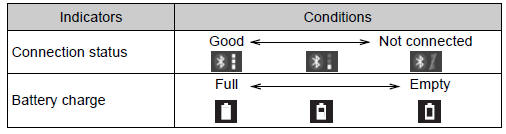
You can check such indicators as signal strength and battery charge on the screen.
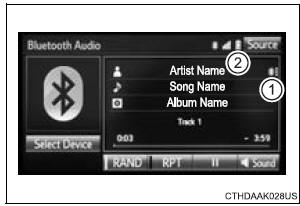
- Connection status
- Battery charge
The battery charge indicator may not be displayed depending on the connected device.
The screen may look different from the illustrations shown in this manual.
Playing Bluetooth® audio
Select  or
or
to Play/Pause.
For details on “Bluetooth* Audio” screen operation methods, refer to Basic Audio Operations. For details on how to select a track or album, refer to selecting, fastforwarding and reversing tracks/files/songs. *: Bluetooth is a registered trademark of Bluetooth SIG, Inc.
Stored owner’s manualImported HTML from the shared Autotk manuals tables. Not an official Toyota site.